“Delivered” Isn’t “Done”

A notification came through on my phone. Order delivered.
One tap showed me the delivery photo. A single small box, sitting on the porch.
There were four boxes in that order. Not one.
The other three were still somewhere between a warehouse and my porch.
My assistant had already closed the file. As far as it was concerned, the job was finished.
It wasn’t.
One item scanned as delivered. The AI took that single scan and rounded the entire order up to complete.
Nobody had told it that four boxes needed four scans before this order actually counted as done.
That’s Not a Shipping Problem. That’s a Definition Problem.

It’s easy to laugh this off as one sloppy delivery app. I nearly did.
Then I thought about how many operations tools run on the exact same shortcut.
A work order gets marked complete the moment the first status update rolls in. A maintenance ticket closes when a part gets ordered, not when it gets installed. A shift log says a changeover is done because the first station reset, while three more are still running the old setup.
Same blind spot. Different floor.
The Operational Definition of Done: What It Is and Why Your AI Needs One
Software teams ran into this exact problem years before AI showed up on a shop floor. Their fix has a name: a definition of done, a written, specific list of conditions a task has to meet before anyone’s allowed to call it finished.
It’s not a fuzzy target. It’s a checklist, agreed on ahead of time, that removes the guesswork about whether something is actually complete.
Most AI tools showing up in operations right now don’t have one. They infer completion from whatever signal is easiest to grab: the first status ping, the first scan, the first “yes” in a chain of steps that actually needs several.
What Counts as an Actual AI Completion Signal
Before you hand any process to an AI tool, whether it’s tracking a delivery, closing a work order, or logging a changeover, it needs a real answer to one question. What specifically has to be true before this counts as finished?
That answer usually has more parts than it first appears to.
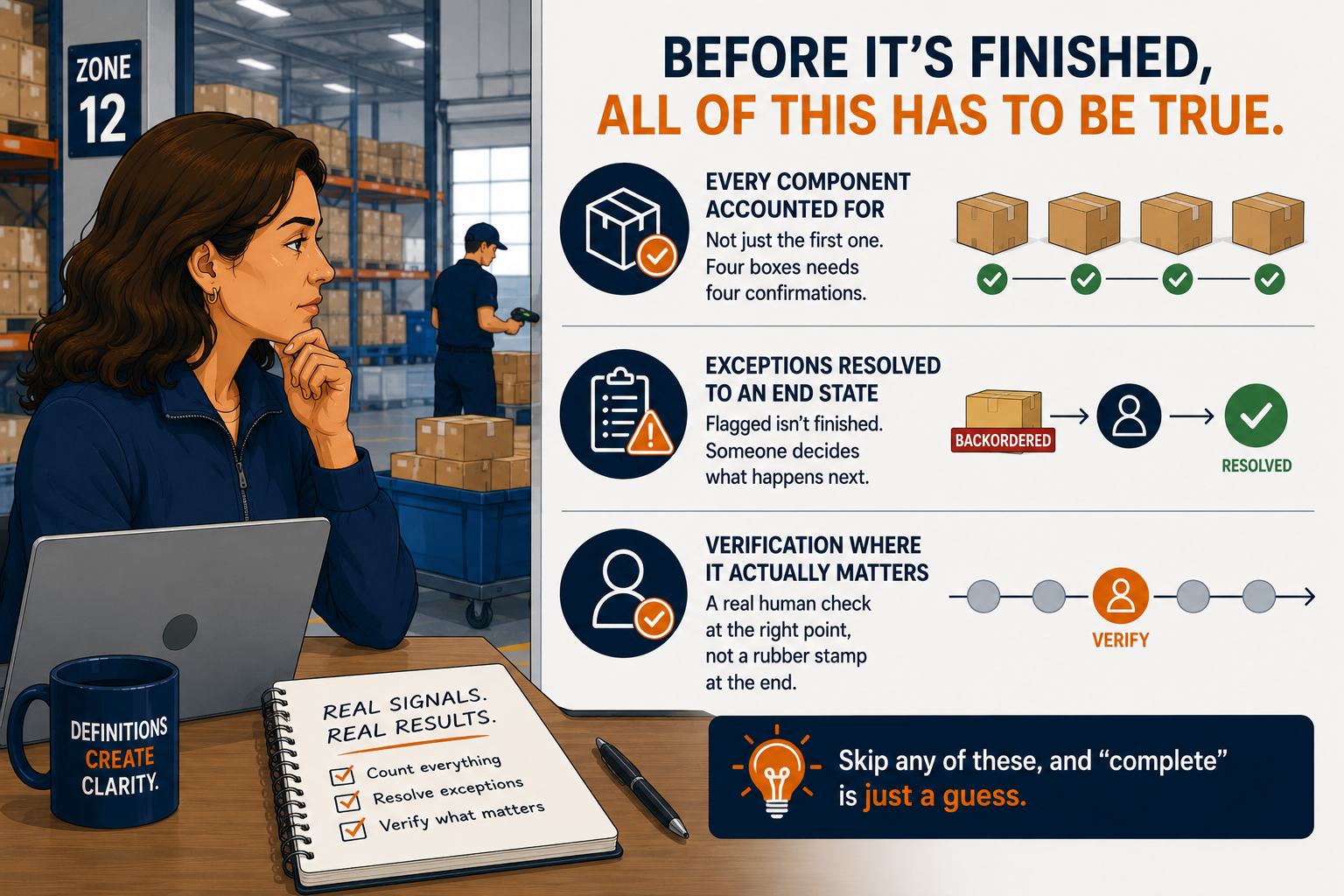
● Every component accounted for, not just the first one. Four boxes needs four confirmations, not one.
● Exceptions resolved to an end state, not just flagged. A part on backorder isn’t handled until someone decides what happens next.
● A verification step placed at the point that actually matters, not a rubber stamp tacked onto the end.
Skip any one of these, and you get exactly what I got. A status that says finished, sitting on top of a job that isn’t.
Applying Definition of Done to Your Shop Floor
Take a changeover that touches four stations.
Log it complete the moment the first station resets, and you’ve built the exact same blind spot my delivery app has.
The fix isn’t complicated. Track completion at the level of the actual sub-tasks, not the level of whichever one happens to report in first.
A changeover isn’t done until all four stations report back separately. Same idea as four boxes. Just wearing a different uniform.
The Prompt: Define “Done” for Your Own Process
Give an AI tool, Claude, ChatGPT, or similar, a description of one process you’re thinking about automating, or one you already have some AI assistance running. Ask it to help you write an explicit definition of done before you trust its output on that process. Then adapt this prompt to your situation.
1. List Every Component That Has to Finish
● Name each individual part of the process, not just the first or most visible one.
● For a multi-item order, that’s every item. For a changeover, that’s every station.
2. Ask It to Flag Where “Complete” Could Be Faked
● Have it identify the easiest signal in this process to mistake for finished when it isn’t.
● Example instruction: “Where in this process could a partial result look identical to a complete one?”
3. Require a Separate Status for Exceptions
● Backordered, damaged, delayed, or skipped items need their own status. Not lumped in with “complete,” and not silently dropped.
● Ask the tool to name what happens next for each exception type, not just confirm that one exists.
4. Set the Verification Point
● Decide where a human needs to confirm the result before the process is allowed to close.
● Ask it to suggest the least disruptive point to put that check, based on what you’ve described about the process.
5. Have It Restate Your Definition of Done in Plain Language
● Ask it to read the finished definition back to you in one plain paragraph.
● If that paragraph doesn’t match what you actually meant, the definition isn’t done either.
Five steps, and most of the work is just being specific about something you already know intuitively. The AI’s job is asking the questions you’d forget to ask yourself.
What AI Can’t Decide for You
AI can hold a checklist. It can flag when the checklist and reality don’t match.
It can’t decide what your operation is actually willing to call finished. That’s a business decision, not a technical one. It belongs to whoever answers for the outcome if it’s wrong.
It also can’t feel the difference between a shipment that’s fine to call complete at ninety percent and one where the missing ten percent is the only part your customer actually wanted.
Someone still has to draw that line, on purpose, before the automation ever gets to use it.
Next Up in This Category
None of this works if the process underneath it was never actually written down in the first place.
Next, we look at what happens when you hand AI a process that only exists in someone’s head. It doesn’t fix the confusion. It just runs it faster. LINK: You Can’t Automate a Process You’ve Never Actually Mapped.
Subscribe to The Daily Constraint if you want it the day it goes live.
Had an AI tool call something “done” before it actually was? Tell me what it missed. I promise mine wasn’t the only delivery app that’s ever done this.